 Premmerce
WooCommerce Hooks List: Every Template Hook by Page
This WooCommerce hooks list covers every action hook in WooCommerce’s page templates: the single product page, shop and category pages, cart, checkout, My Account and emails. For each hook you get where it fires and what WooCommerce itself attaches to it, with the priority, so you know exactly where your own code will land. Everything here is checked against the WooCommerce 11.1 templates, and the hook maps are screenshots of a real store with each hook labeled in place.
We build WooCommerce plugins, so we use these hooks every day. Product Filter, for example, hooks into woocommerce_before_shop_loop and woocommerce_product_query to filter the shop page.
How WooCommerce hooks work
There are two kinds of hook:
- Action hooks run your code at a point in the page. Use them to add output: a notice, a badge, a block of text.
- Filter hooks pass you a value and use whatever you return. Use them to change something WooCommerce already outputs: button text, a price, the checkout fields.
You attach a function to a hook with add_action() or add_filter(). The third argument is the priority: lower numbers run first, and the default is 10. This adds a shipping note to every product page, just above the product:
add_action( 'woocommerce_before_single_product', 'acme_shipping_note', 20 );
function acme_shipping_note() {
    echo '<p class="woocommerce-info">Free shipping on orders over $50.</p>';
}
And this filter changes the add to cart button on product pages:
add_filter( 'woocommerce_product_single_add_to_cart_text', 'acme_single_add_to_cart_text' );
function acme_single_add_to_cart_text( $text ) {
    return 'Add to basket';
}
Put snippets like these in a child theme’s functions.php or a code snippets plugin. Never edit WooCommerce’s files or a parent theme: the next update overwrites them.
The WooCommerce hooks list, page by page
Each section below shows one page with its hooks labeled, then every hook on it in the order it fires.
Single product page hooks
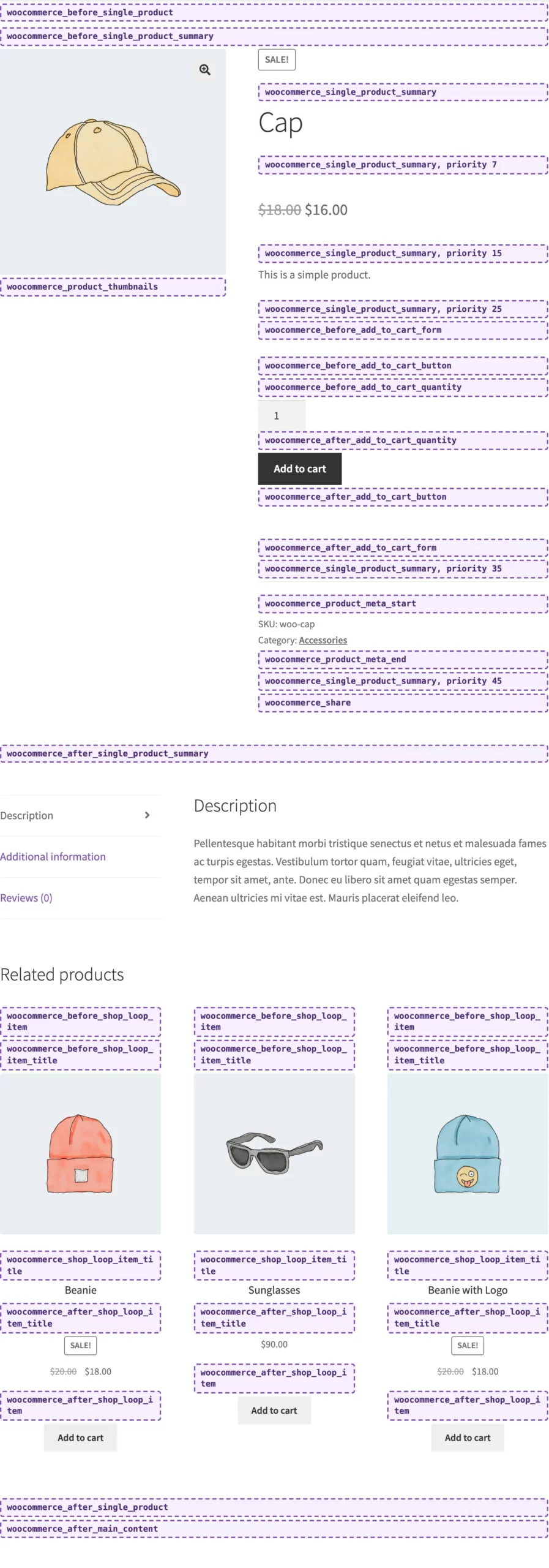
The labels marked “priority 7”, “15” and so on show the gaps between WooCommerce’s own callbacks inside woocommerce_single_product_summary. Hook in at one of those priorities to put something between the title, price, excerpt, add to cart button and product meta.
| Hook | What WooCommerce attaches (priority) |
|---|---|
woocommerce_before_main_content |
content wrapper (10), breadcrumb (20) |
woocommerce_before_single_product |
notices (10) |
woocommerce_before_single_product_summary |
sale flash (10), product images (20) |
woocommerce_product_thumbnails |
gallery thumbnails (20) |
woocommerce_single_product_summary |
title (5), rating (10), price (10), excerpt (20), add to cart (30), meta (40), sharing (50) |
woocommerce_product_meta_start |
nothing |
woocommerce_product_meta_end |
nothing |
woocommerce_share |
nothing |
woocommerce_after_single_product_summary |
tabs (10), upsells (15), related products (20) |
woocommerce_product_after_tabs |
nothing |
woocommerce_after_single_product |
nothing |
woocommerce_after_main_content |
content wrapper end (10) |
woocommerce_sidebar |
sidebar (10) |
The add to cart form has its own hooks, in this order:
Premmerce Product Filter for WooCommerce
Get started giving your customers a better way to filter your products to increase site usability and revenue.
woocommerce_before_add_to_cart_formwoocommerce_before_add_to_cart_buttonwoocommerce_before_add_to_cart_quantitywoocommerce_after_add_to_cart_quantitywoocommerce_after_add_to_cart_buttonwoocommerce_after_add_to_cart_form
Variable products add woocommerce_before_variations_form, woocommerce_after_variations_table, woocommerce_before_single_variation, woocommerce_single_variation (the variation’s price and stock at 10, the add to cart button at 20), woocommerce_after_single_variation and woocommerce_after_variations_form.
Each review runs woocommerce_review_before (avatar), woocommerce_review_before_comment_meta (star rating), woocommerce_review_meta (author and date), woocommerce_review_before_comment_text, woocommerce_review_comment_text (the review) and woocommerce_review_after_comment_text.
If you’re adding a button next to add to cart, woocommerce_after_add_to_cart_button is usually the spot. Our buy now button tutorial covers a ready-made way to do it.
Shop and category page hooks
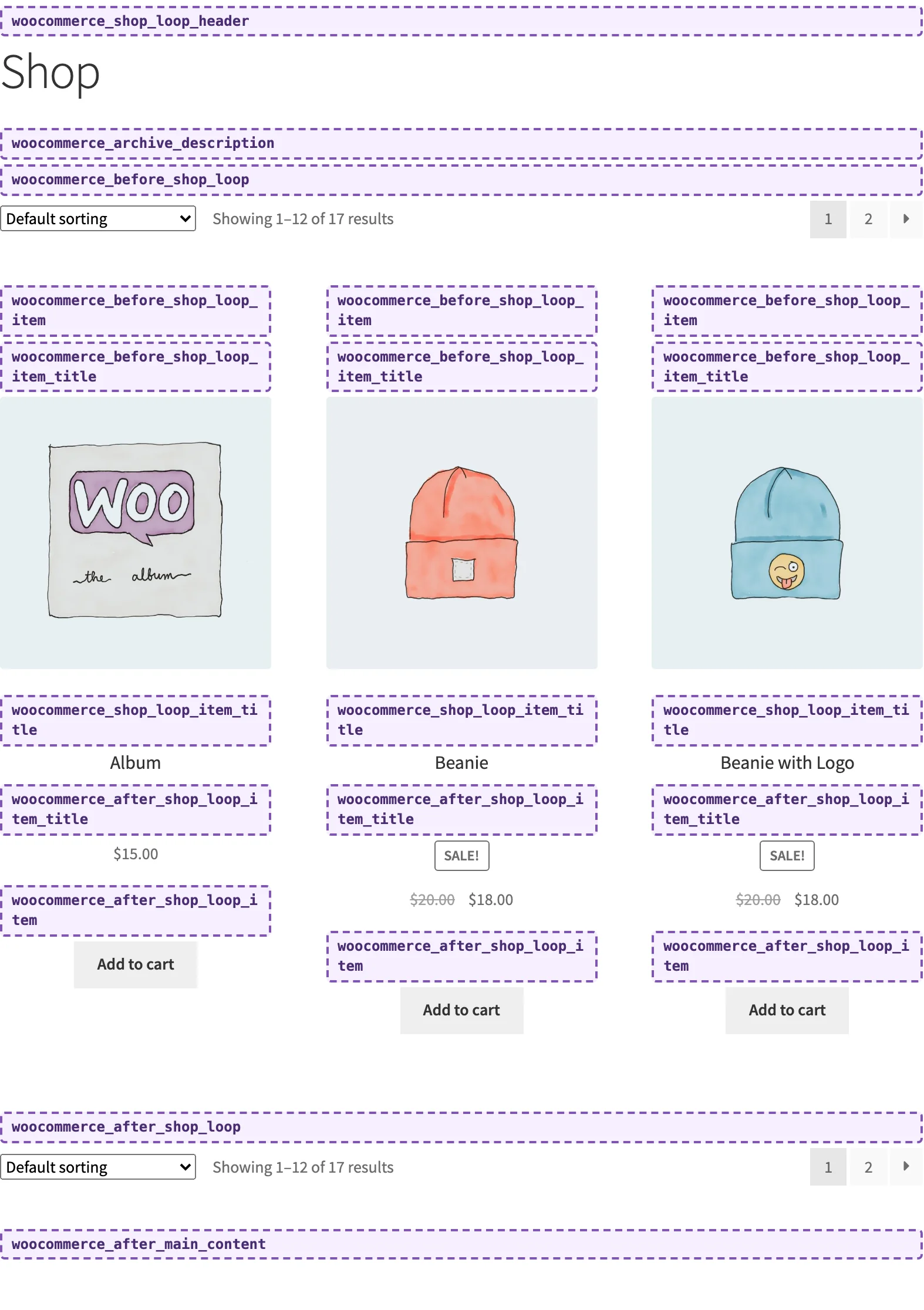
The shop page, category pages and tag pages share one template, archive-product.php.
| Hook | What WooCommerce attaches (priority) |
|---|---|
woocommerce_before_main_content |
content wrapper (10), breadcrumb (20) |
woocommerce_shop_loop_header |
page title and archive description (10) |
woocommerce_archive_description |
taxonomy description (10), shop page description (10) |
woocommerce_before_shop_loop |
notices (10), result count (20), sorting dropdown (30) |
woocommerce_shop_loop |
nothing; runs once per product, before its card |
woocommerce_after_shop_loop |
pagination (10) |
woocommerce_no_products_found |
“No products were found” message (10) |
woocommerce_after_main_content |
content wrapper end (10) |
woocommerce_sidebar |
sidebar (10) |
Each product card in the grid runs these:
| Hook | What WooCommerce attaches (priority) |
|---|---|
woocommerce_before_shop_loop_item |
link open (10) |
woocommerce_before_shop_loop_item_title |
sale flash (10), thumbnail (10) |
woocommerce_shop_loop_item_title |
product title (10) |
woocommerce_after_shop_loop_item_title |
rating (5), price (10) |
woocommerce_after_shop_loop_item |
link close (5), add to cart button (10) |
Subcategory cards (when the shop shows categories) have their own set: woocommerce_before_subcategory, woocommerce_before_subcategory_title, woocommerce_shop_loop_subcategory_title, woocommerce_after_subcategory_title and woocommerce_after_subcategory.
Filter plugins live on these hooks. If you’re building a large catalog, our guide to filtering products by a custom taxonomy shows what’s possible without writing the query code yourself.
Cart page hooks
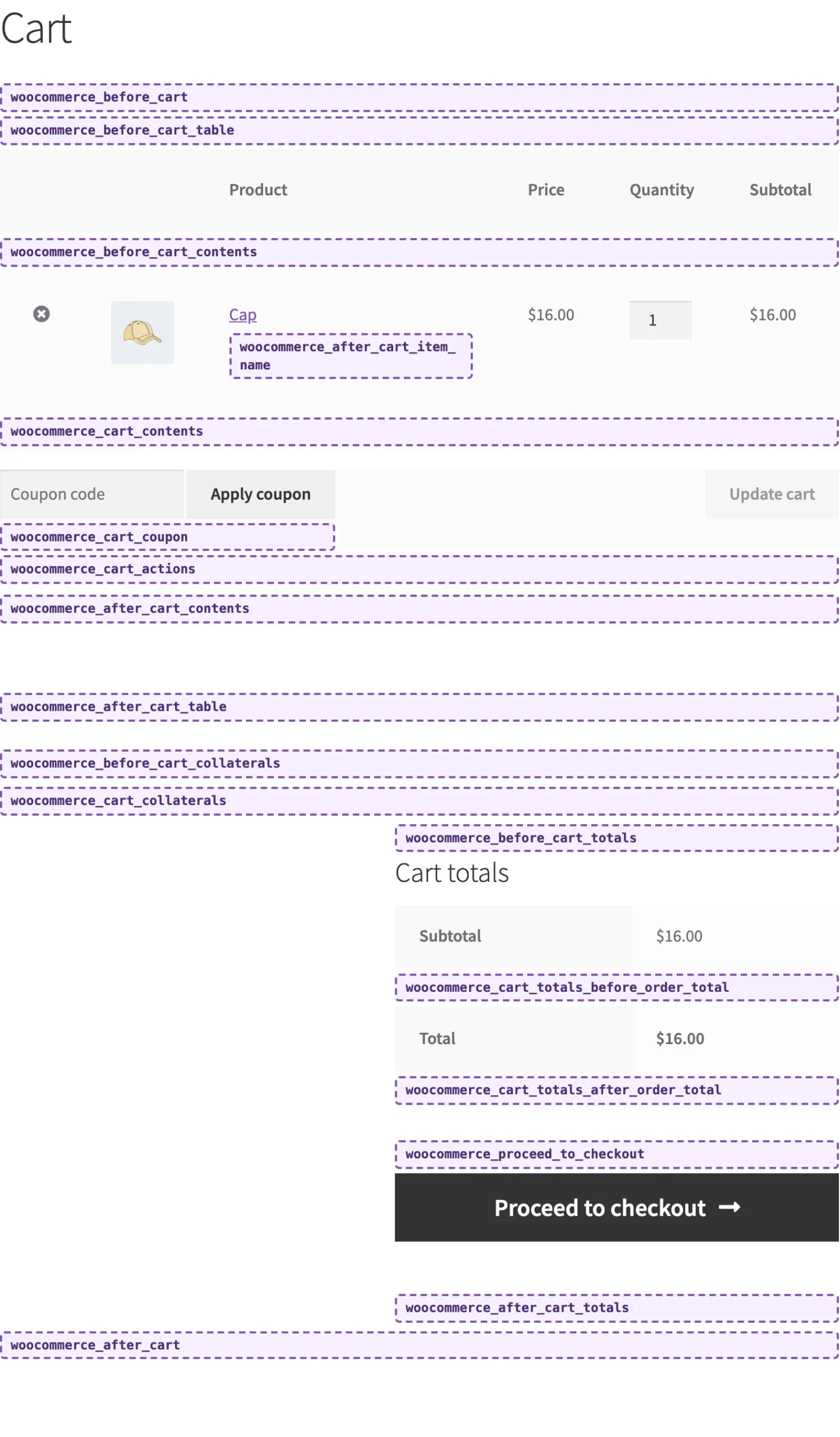
| Hook | What WooCommerce attaches (priority) |
|---|---|
woocommerce_before_cart |
notices (10) |
woocommerce_before_cart_table |
nothing |
woocommerce_before_cart_contents |
nothing; inside the table, before the first item |
woocommerce_after_cart_item_name |
nothing; under each item’s name |
woocommerce_cart_contents |
nothing; after the last item |
woocommerce_cart_coupon |
nothing; inside the coupon form |
woocommerce_cart_actions |
nothing; beside the Update cart button |
woocommerce_after_cart_contents |
nothing |
woocommerce_after_cart_table |
nothing |
woocommerce_before_cart_collaterals |
nothing |
woocommerce_cart_collaterals |
cross-sells (10), cart totals (10) |
woocommerce_before_cart_totals |
nothing |
woocommerce_cart_totals_before_shipping |
nothing |
woocommerce_cart_totals_after_shipping |
nothing |
woocommerce_cart_totals_before_order_total |
nothing |
woocommerce_cart_totals_after_order_total |
nothing |
woocommerce_proceed_to_checkout |
express payment buttons (10), Proceed to checkout button (20) |
woocommerce_after_cart_totals |
nothing |
woocommerce_after_cart |
nothing |
The hooks inside the cart table and totals table fire between table rows, so anything you output there needs to be a <tr> with cells, or it breaks the table.
When the cart is empty, WooCommerce runs woocommerce_cart_is_empty instead (notices at 5, the empty cart message at 10). The shipping calculator adds woocommerce_before_shipping_calculator and woocommerce_after_shipping_calculator, and each shipping rate runs woocommerce_after_shipping_rate.
The mini cart (the cart widget and most theme header carts) has woocommerce_before_mini_cart, woocommerce_before_mini_cart_contents, woocommerce_mini_cart_contents, woocommerce_widget_shopping_cart_total (subtotal at 10), woocommerce_widget_shopping_cart_before_buttons, woocommerce_widget_shopping_cart_buttons (View cart at 10, Checkout at 20), woocommerce_widget_shopping_cart_after_buttons and woocommerce_after_mini_cart.
Checkout page hooks
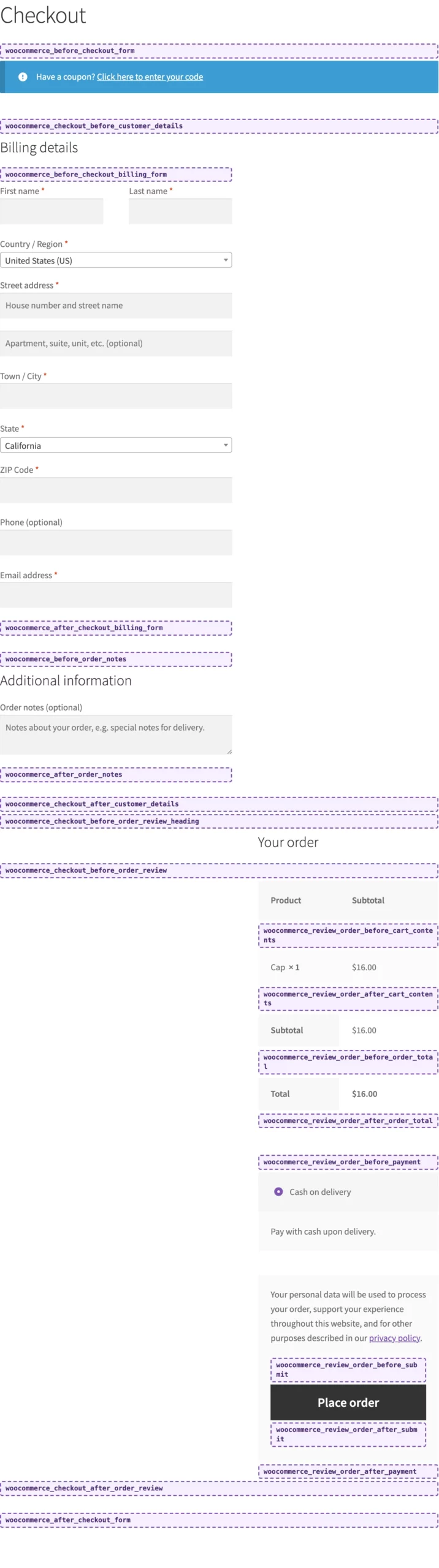
| Hook | What WooCommerce attaches (priority) |
|---|---|
woocommerce_before_checkout_form |
login form (10), coupon form (10), notices (10) |
woocommerce_checkout_before_customer_details |
express payment buttons (30) |
woocommerce_checkout_billing |
billing form |
woocommerce_before_checkout_billing_form |
nothing |
woocommerce_after_checkout_billing_form |
nothing |
woocommerce_before_checkout_registration_form |
nothing; only when guests can create an account |
woocommerce_after_checkout_registration_form |
nothing |
woocommerce_checkout_shipping |
shipping form |
woocommerce_before_checkout_shipping_form |
nothing |
woocommerce_after_checkout_shipping_form |
nothing |
woocommerce_before_order_notes |
nothing |
woocommerce_after_order_notes |
nothing |
woocommerce_checkout_after_customer_details |
nothing |
woocommerce_checkout_before_order_review_heading |
nothing |
woocommerce_checkout_before_order_review |
nothing |
woocommerce_checkout_order_review |
order review table (10), payment section (20) |
woocommerce_review_order_before_cart_contents |
nothing; table row |
woocommerce_review_order_after_cart_contents |
nothing; table row |
woocommerce_review_order_before_shipping |
nothing; table row |
woocommerce_review_order_after_shipping |
nothing; table row |
woocommerce_review_order_before_order_total |
nothing; table row |
woocommerce_review_order_after_order_total |
nothing; table row |
woocommerce_review_order_before_payment |
nothing |
woocommerce_review_order_before_submit |
nothing; just above Place order |
woocommerce_review_order_after_submit |
nothing |
woocommerce_review_order_after_payment |
nothing |
woocommerce_checkout_after_order_review |
nothing |
woocommerce_after_checkout_form |
nothing |
WooCommerce reloads the order review and payment section over AJAX whenever the customer changes their address, so output on those hooks must come from PHP that runs on every request, not just the first page load.
After the order, the thank you page runs woocommerce_before_thankyou, woocommerce_thankyou_{payment method ID} (for example woocommerce_thankyou_cod), then woocommerce_thankyou, which shows the order details table at 10. That table has woocommerce_order_details_before_order_table, woocommerce_order_details_before_order_table_items, woocommerce_order_item_meta_start and woocommerce_order_item_meta_end (per item), woocommerce_order_details_after_order_table_items, woocommerce_order_details_after_order_table (Order again button at 10), woocommerce_after_order_details, woocommerce_order_details_after_customer_address and woocommerce_order_details_after_customer_details. The same table appears when a customer views an order in My Account.
My Account page hooks
| Hook | Where it fires |
|---|---|
woocommerce_account_navigation |
the account menu (WooCommerce’s menu at 10) |
woocommerce_before_account_navigation, woocommerce_after_account_navigation |
around the menu |
woocommerce_account_content |
the current tab’s content (notices at 5, content at 10) |
woocommerce_account_dashboard |
the Dashboard tab |
woocommerce_before_my_account, woocommerce_after_my_account |
Dashboard tab, kept for older themes |
woocommerce_before_account_orders, woocommerce_before_account_orders_pagination, woocommerce_after_account_orders |
Orders tab |
woocommerce_before_account_downloads, woocommerce_available_downloads, woocommerce_after_account_downloads |
Downloads tab (downloads table at 10) |
woocommerce_before_edit_account_address_form, woocommerce_after_edit_account_address_form |
Addresses tab, editing an address |
woocommerce_before_edit_account_form, woocommerce_edit_account_form_start, woocommerce_edit_account_form_fields, woocommerce_edit_account_form, woocommerce_edit_account_form_end, woocommerce_after_edit_account_form |
Account details tab |
The login and registration forms, shown to logged-out visitors, have woocommerce_before_customer_login_form, woocommerce_login_form_start, woocommerce_login_form, woocommerce_login_form_end, woocommerce_register_form_start, woocommerce_register_form (privacy policy text at 20), woocommerce_register_form_end and woocommerce_after_customer_login_form.
Email hooks
WooCommerce builds every transactional email from the same hooks, so one function can change all of them. The $email argument tells you which email is being sent.
| Hook | What WooCommerce attaches (priority) |
|---|---|
woocommerce_email_header |
email header (10) |
woocommerce_email_order_details |
downloads (10), order details table (10) |
woocommerce_email_before_order_table |
nothing |
woocommerce_email_after_order_table |
nothing |
woocommerce_order_item_meta_start, woocommerce_order_item_meta_end |
nothing; per item, shared with the order details page |
woocommerce_email_order_meta |
order meta (10) |
woocommerce_email_customer_details |
customer details (10), addresses (20), extra checkout fields (30) |
woocommerce_email_footer |
email footer (10) |
This adds a line under the order table in the processing order email only:
add_action( 'woocommerce_email_after_order_table', 'acme_processing_email_note', 10, 4 );
function acme_processing_email_note( $order, $sent_to_admin, $plain_text, $email ) {
    if ( 'customer_processing_order' !== $email->id || $plain_text ) {
        return;
    }
    echo '<p>We pack orders within one working day.</p>';
}
Useful WooCommerce filter hooks
Most changes to text and layout are a filter, not a template override.
| Filter | What it changes |
|---|---|
woocommerce_product_single_add_to_cart_text |
the add to cart button text on product pages |
woocommerce_product_add_to_cart_text |
the add to cart button text in the shop grid |
woocommerce_get_price_html |
the price HTML everywhere a price is shown |
woocommerce_sale_flash |
the “Sale!” badge |
woocommerce_product_tabs |
the tabs under the product: add, remove, rename or reorder |
woocommerce_checkout_fields |
the classic checkout’s fields: labels, order, required or not |
loop_shop_per_page |
products per page on the shop and category pages |
loop_shop_columns |
columns in the shop grid |
woocommerce_cart_item_name |
each item’s name in the cart and order review |
For example, this removes the Reviews tab and renames Additional information:
add_filter( 'woocommerce_product_tabs', 'acme_product_tabs', 98 );
function acme_product_tabs( $tabs ) {
    unset( $tabs['reviews'] );
    if ( isset( $tabs['additional_information'] ) ) {
        $tabs['additional_information']['title'] = 'Specifications';
    }
    return $tabs;
}
How to remove or move WooCommerce’s default output
The priorities in the tables above are what you need to unhook something. remove_action() has to match the hook, the function and the priority exactly. This moves the price below the short description on product pages:
add_action( 'init', 'acme_move_single_price' );
function acme_move_single_price() {
    remove_action( 'woocommerce_single_product_summary', 'woocommerce_template_single_price', 10 );
    add_action( 'woocommerce_single_product_summary', 'woocommerce_template_single_price', 25 );
}
The same pattern removes related products (woocommerce_output_related_products at 20 on woocommerce_after_single_product_summary), the result count (woocommerce_result_count at 20 on woocommerce_before_shop_loop) or the sorting dropdown (woocommerce_catalog_ordering at 30). Our article on related products covers no-code ways to change them instead.
Some themes move WooCommerce’s callbacks to other hooks or priorities. If remove_action() does nothing, check what the theme attaches.
Hooks on block themes and the Cart and Checkout blocks
Everything above is how WooCommerce’s PHP templates work. Two things change on a modern store:
- Block themes (Twenty Twenty-Five and other themes with a Site Editor) build the product and shop pages from blocks. WooCommerce runs a compatibility layer there: it fires the main product page and shop hooks in the matching places around the blocks, and removes its own default callbacks so nothing appears twice. Your
add_action()code keeps working. Hooks inside a block’s own markup, like the cart table rows, may not. - The Cart and Checkout blocks, which new stores get by default, don’t use the cart and checkout templates at all, so none of the cart or checkout hooks in this guide fire. They’re extended with WooCommerce’s Store API and JavaScript instead. If your store relies on the classic hooks, put the
[woocommerce_cart]and[woocommerce_checkout]shortcodes back on the Cart and Checkout pages (in a Shortcode block) and they all fire again.
If a customization that used to work on checkout suddenly does nothing, check whether the page has switched to the Checkout block. That’s usually the cause.
How we made the hook maps
The screenshots come from a test store with a small must-use plugin that hooks a label into each hook at priority 1. You can do the same on a staging site to see where any hook fires in your theme:
foreach ( array( 'woocommerce_before_shop_loop', 'woocommerce_after_shop_loop_item_title' ) as $hook ) {
    add_action( $hook, function () use ( $hook ) {
        echo '<div style="border:2px dashed #7f54b3;padding:4px;font:12px monospace">' . esc_html( $hook ) . '</div>';
    }, 1 );
}
Your theme can move or remove hooks, so the map for your own store is the one that counts.
Build on WooCommerce without writing every hook yourself
Hooks are the right tool for small changes. For bigger ones, a plugin that’s already built on them saves time:
- Premmerce Product Filter for WooCommerce adds AJAX filters by attribute, category, price, brand and stock to the shop and category pages, and can generate SEO pages for filter combinations. It’s free on wordpress.org, with more filter types in the premium version.
- Premmerce Permalink Manager for WooCommerce changes product and category URLs without code, with automatic 301 redirects. If you’re working on URLs, our guide to the best WooCommerce permalink structure explains the options.
Try Product Filter free on wordpress.org.
Comments


Ready to Get Started?
Join over 100,000 smart shop owners who use Premmerce plugins to power their WooCommerce stores.
Get started