 Premmerce
 8 Best WooCommerce Multi Currency Plugins (2026)

WooCommerce sells in one currency out of the box. A WooCommerce multi currency plugin adds the rest: a currency switcher, exchange rates, prices shown in the visitor’s currency and, with most plugins, payment in that currency too. This guide compares the eight that matter in 2026, with what each free version really includes, prices checked on October 3, 2026, and where each one is the better choice.
We make one of them, Premmerce Multi-currency for WooCommerce, so we’ve said plainly where the others are stronger.
How do I accept multiple currencies in WooCommerce?
WooCommerce has a single store currency under WooCommerce > Settings > General. Every price, coupon and shipping rate is stored in it, and every order is charged in it. To sell in more than one currency you need either:
- WooPayments, if it’s your payment gateway: multi-currency is built in
- A multi-currency plugin, which works with whatever gateway you use
Either way, the plugin converts prices from your store currency at an exchange rate you set or fetch automatically. The better plugins also let you set some prices by hand per currency, so a product can be €19 in Europe rather than €18.43.
One thing no plugin can do for you: your payment gateway has to accept the currency. Stripe and PayPal take most major currencies; many local gateways and bank transfer setups only take one. Check that before you add a currency to the switcher.
How to choose a WooCommerce multi currency plugin
Five questions separate these plugins more than any feature list:
- Does the customer pay in their currency, or only see it? Some plugins convert prices for display and then charge in your store currency at checkout. That surprises customers. Every plugin below can charge in the chosen currency, but in some it’s an option you have to turn on, and in YayCurrency it’s a Pro feature.
- How many currencies does the free version allow? FOX and CURCY’s free versions stop at two. Premmerce Multi-currency’s free version has no limit.
- Can you set prices by hand? Converted prices follow the exchange rate every day. If you want fixed prices per market (for supplier price lists or tidy local prices), check how the plugin does it: a fixed price per currency, or a base currency per product.
- Does it work with your page cache? A cached shop page shows whatever currency the first visitor had. Look for a cache-compatible mode that loads prices after the page.
- Do you need translation too? If you’ll translate the store with WPML anyway, its multi-currency is already there and free.
WooCommerce multi currency plugins compared
Prices are for a single site for one year, checked on October 3, 2026.
| Plugin | Free version | Paid from | Fixed prices | Geolocation |
|---|---|---|---|---|
| Premmerce Multi-currency | Yes, unlimited currencies | $49.99/year | Base currency per product (premium) | Premium |
| WooPayments multi-currency | Built in, needs WooPayments | Free; 2% conversion fee per payment | No, converted only | Yes |
| WPML Multilingual & Multicurrency for WooCommerce | Yes, all multi-currency features | Free (WPML only for translation) | Yes, per currency | Yes |
| FOX Currency Switcher | Yes, 2 currencies | $49/year | Yes, per currency | Yes |
| CURCY | Yes, 2 currencies | $69/year ($39 for 6 months) | Yes, per currency | Yes |
| Price Based on Country | Yes | $59/year | Yes, per country zone | Yes |
| YayCurrency | Yes, limited | $99/year | Not listed | Pro |
| Aelia Currency Switcher | No | £89/year (ex. VAT) | Yes, per currency, and base currency per product | Yes |
1. Premmerce Multi-currency for WooCommerce
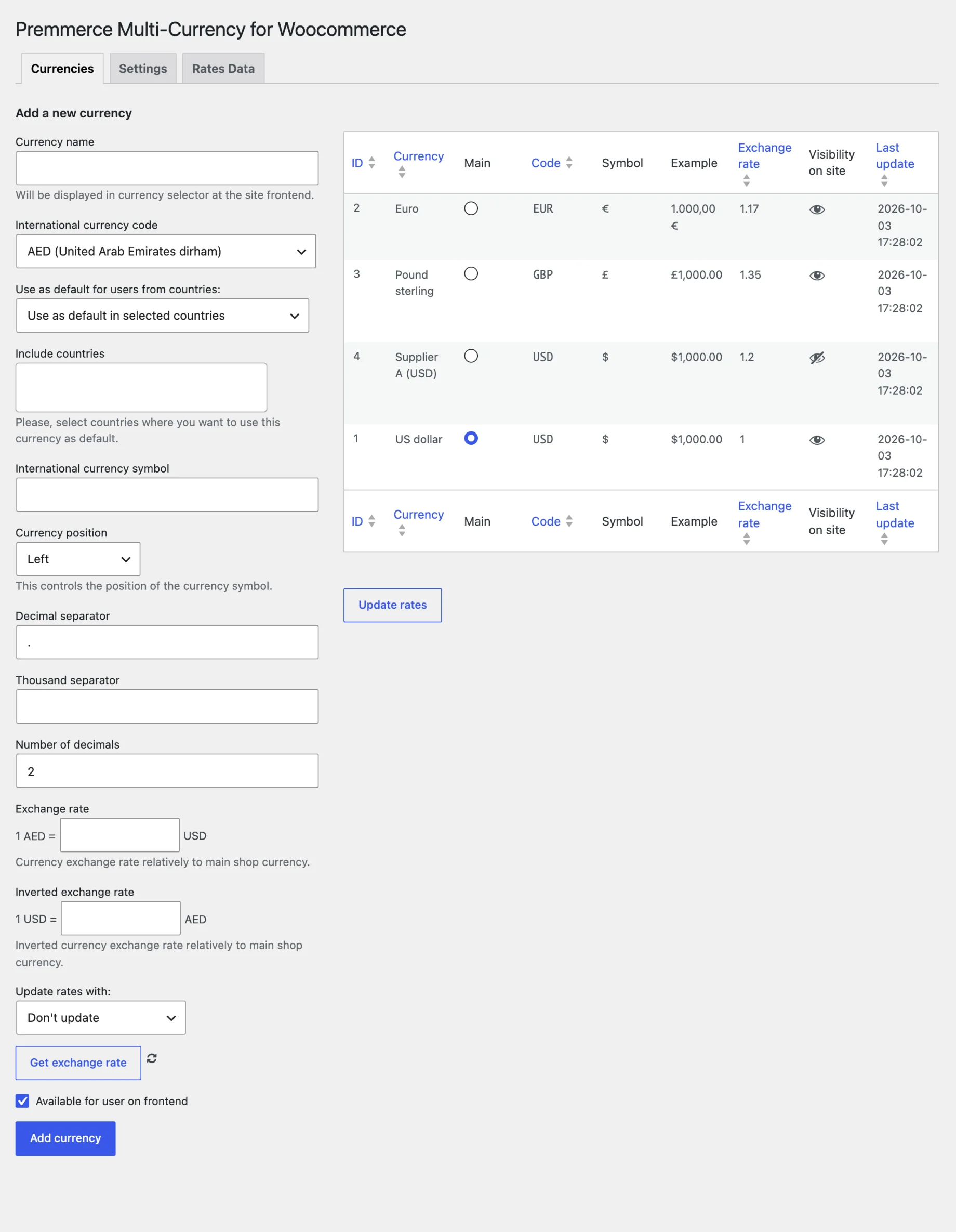
Premmerce Multi-currency for WooCommerce is our plugin. Its free version has no currency limit: add as many currencies as you like under Premmerce > Multi-Currency, each with its own name, symbol, symbol position (left, right, with or without a space), decimal and thousand separators, number of decimals and exchange rate. When you activate it, WooCommerce’s own currency options move to this page, so there’s one place to manage them.
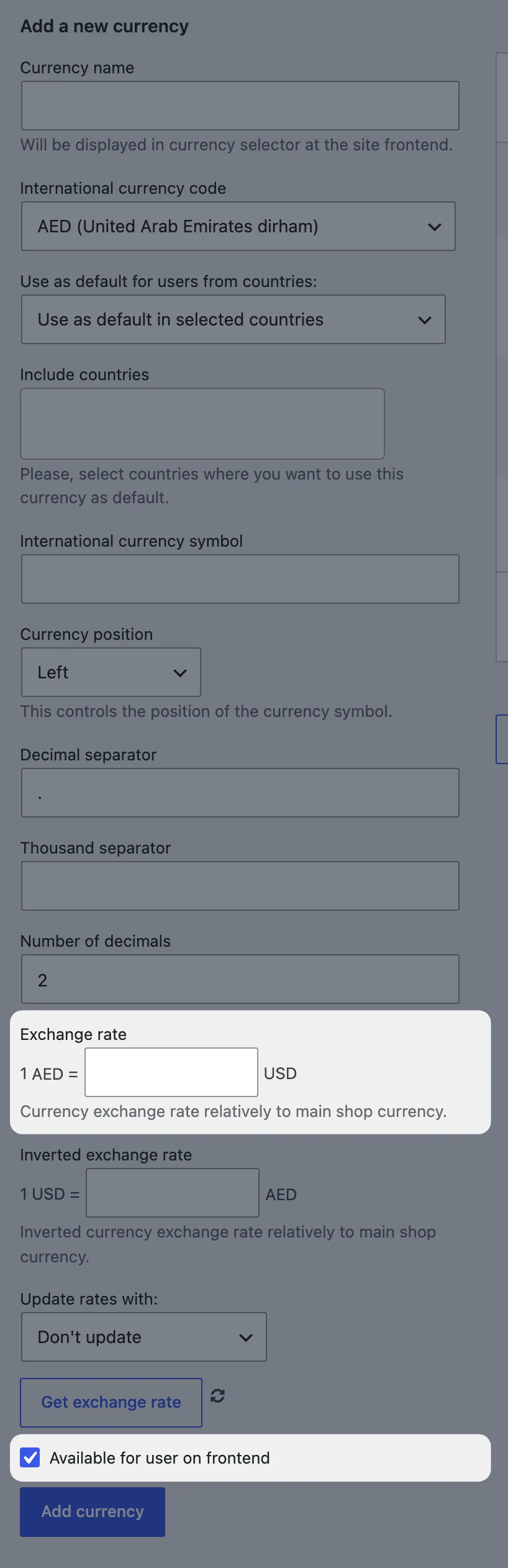
Exchange rates are entered as “1 EUR = 1.17 USD”, with an inverted field if you think the other way round. Customers switch currency with the Premmerce Multi-Currency widget or the [multicurrency] shortcode, which you can put anywhere: a sidebar, the header, a product page.
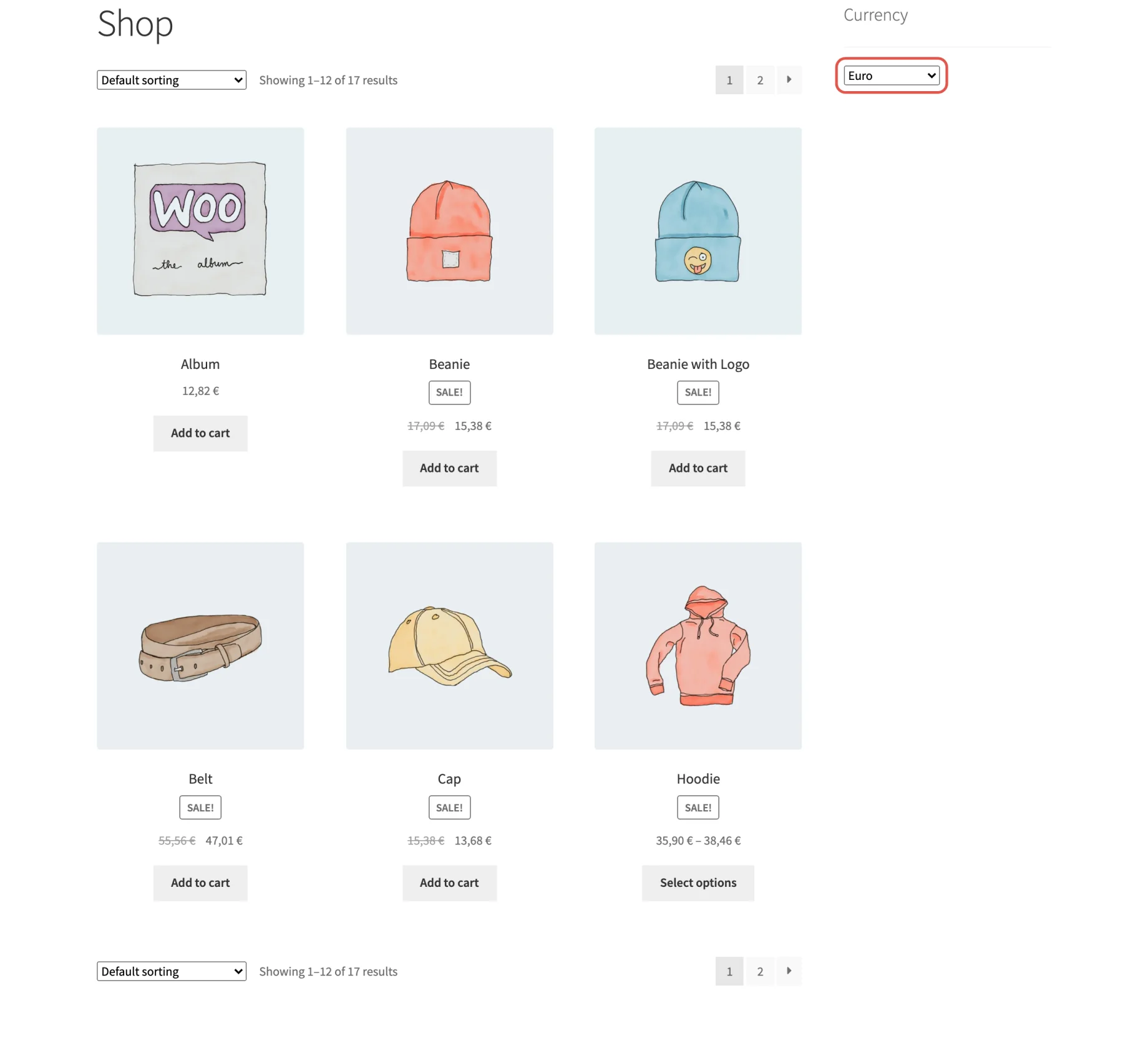
The chosen currency carries through the cart, checkout, order and emails, and the order is recorded in that currency. Fixed-amount coupons, shipping rates and the free shipping minimum are converted too, so a “free shipping over $50” rule still works for a customer paying in pounds.
Where it’s different: a base currency for each product (premium). Most plugins price everything in your store currency and convert. The premium version adds a Currency box to the product editor, so you can price one product in pounds and another in dollars. A UK customer sees exactly the £15.00 you entered; everyone else sees it converted from pounds. Of the other plugins here, only Aelia does this.
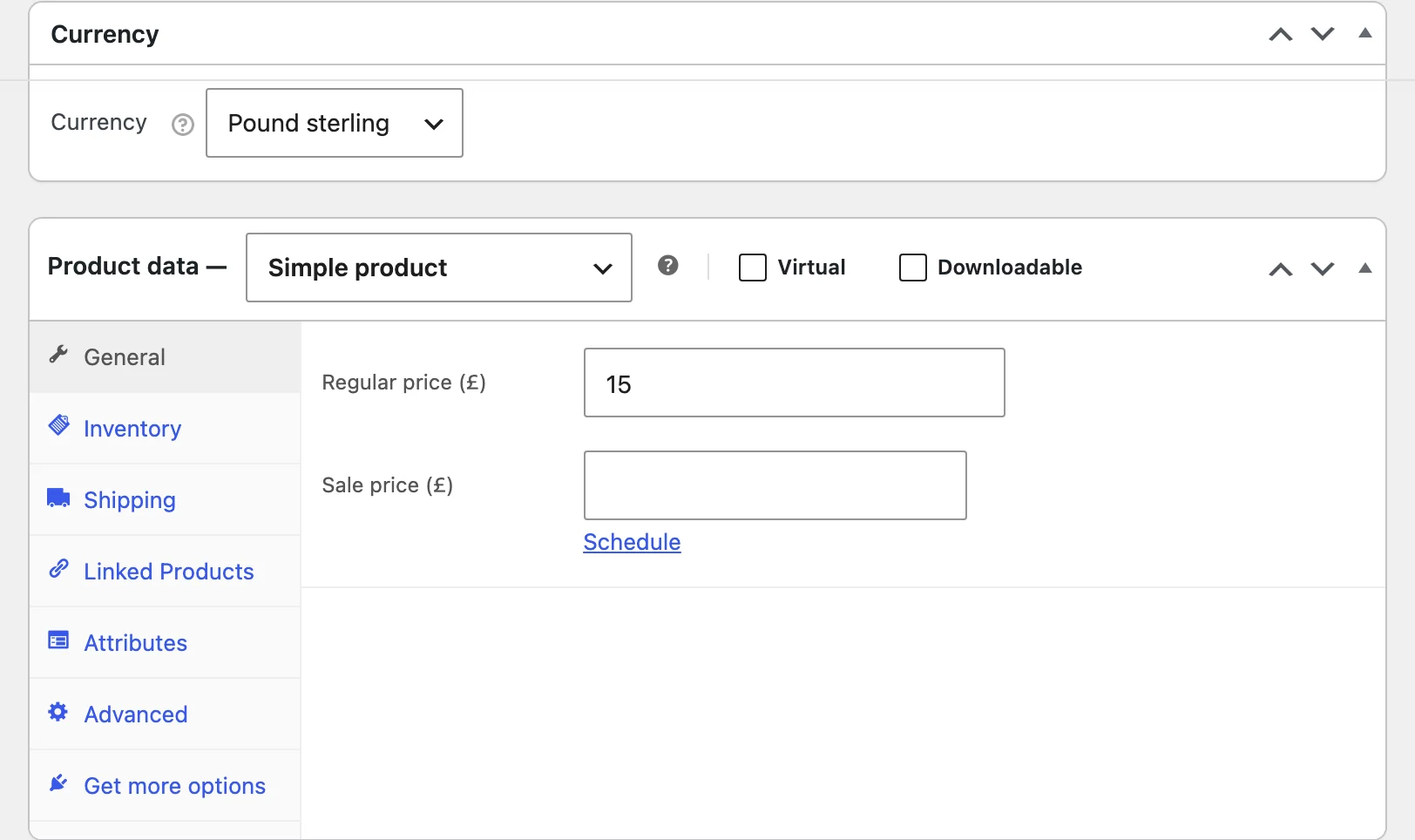
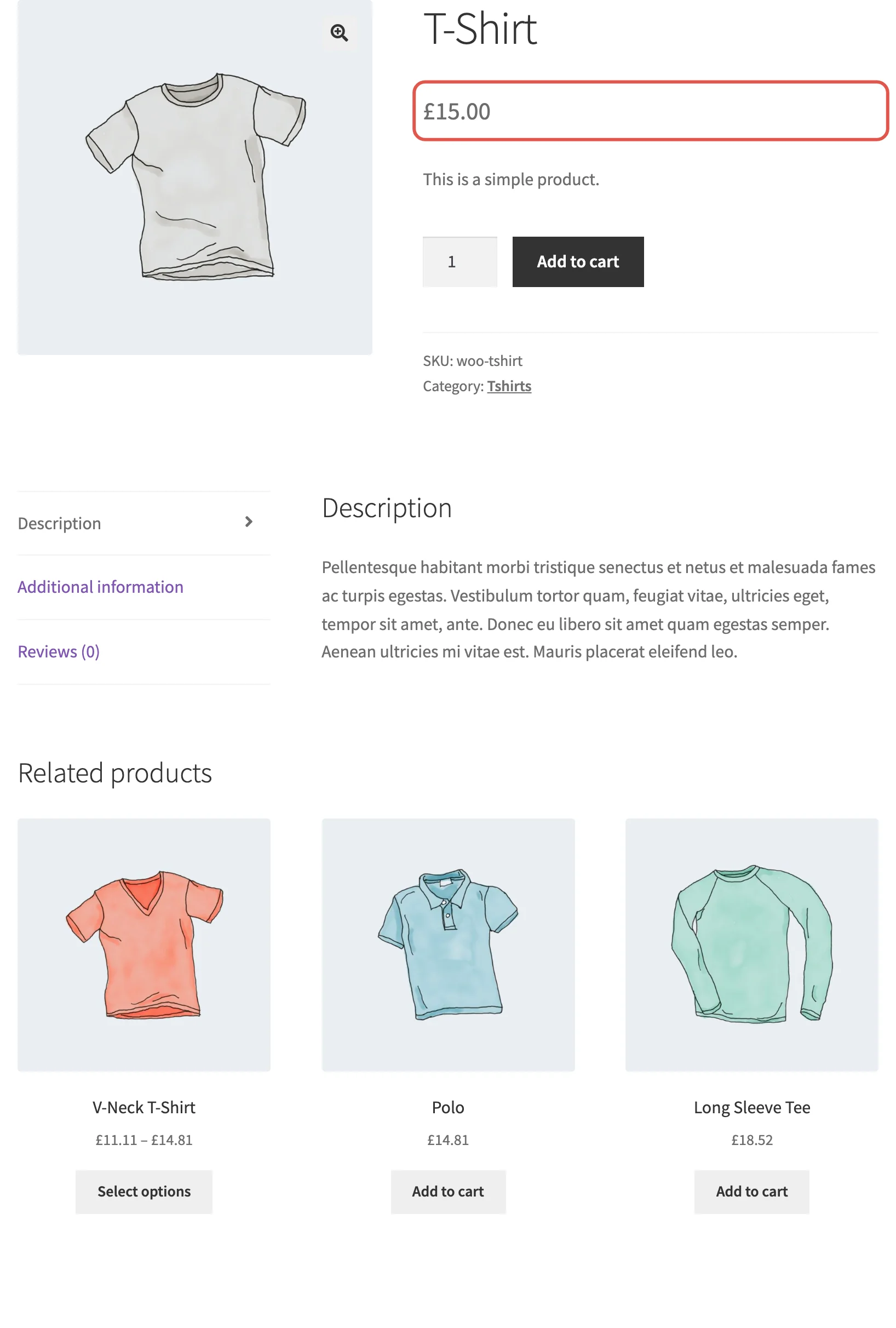
That helps when:
- A supplier sells to you in another currency. Price their products in that currency and your prices follow the exchange rate, so a weaker dollar doesn’t eat your margin.
- You want a markup per supplier. Add a second US dollar currency with a rate of 1.2 and untick Available for user on frontend. Customers never see it. A product priced at $50.00 in that internal currency shows as $60.00 in your store: the 20% markup is the exchange rate. Change the rate and every product from that supplier is repriced.
- A product sells mostly in one market. Price it in that market’s currency and the local price stays fixed, whatever the exchange rate does.
We walk through this in how to set different currencies for different products.
Other premium features:
- Geolocation: set a currency as the default for visitors from selected countries, using WooCommerce’s geolocation
- Automatic exchange rates from Currencylayer (you need an API key), on a schedule from every minute to monthly, or with an Update rates button
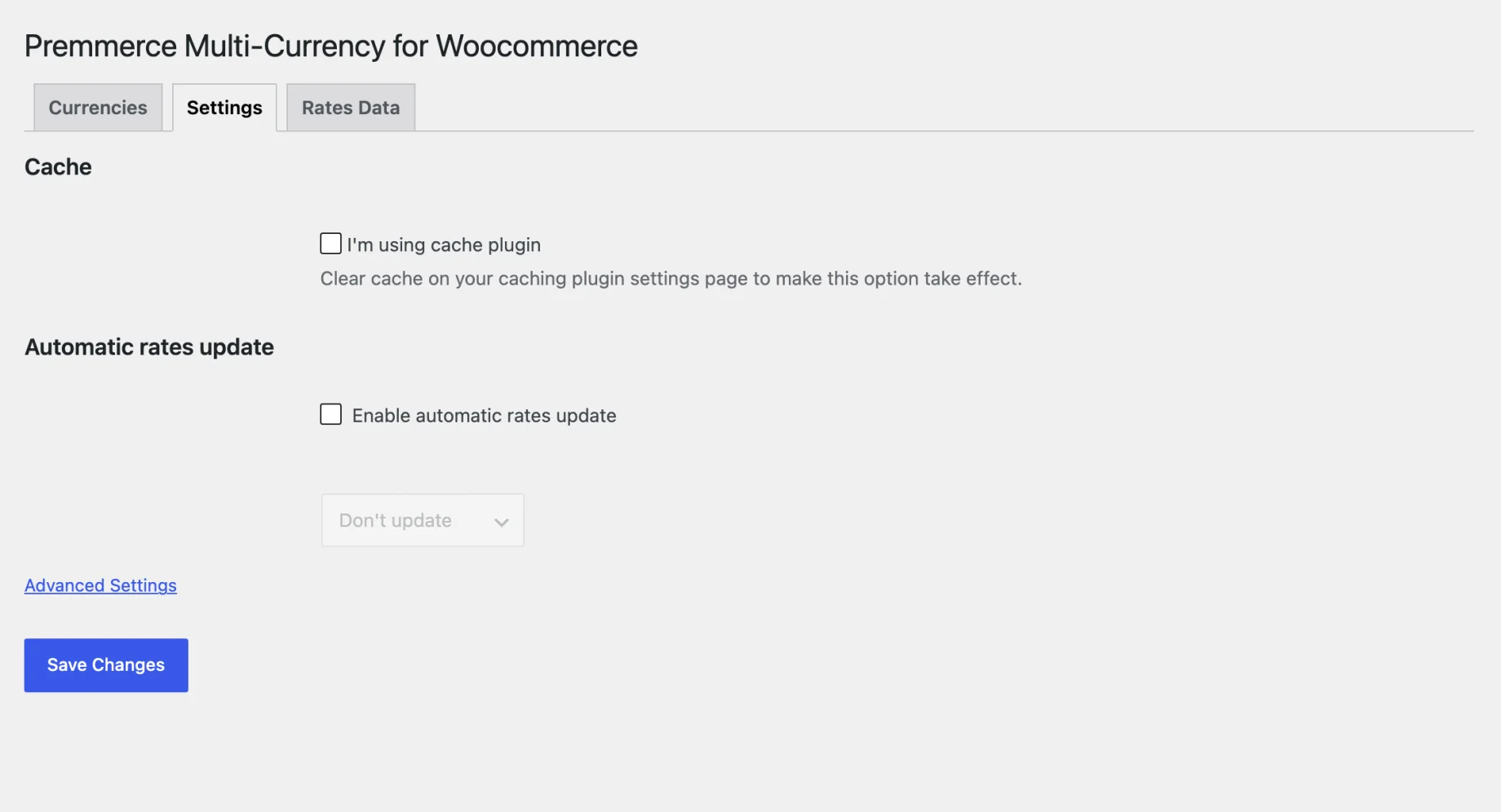
Both versions have an I’m using cache plugin option on the Settings tab, which loads prices after the page so cached pages show the right currency.
Where the others are stronger: there’s no per-currency fixed price for a single product (one base currency per product instead), no rule to hide payment methods per currency, no price rounding to .99 endings, and the switcher is a dropdown, with no flags or block. If you need those, FOX, CURCY or WPML below cover them.
Price: free on wordpress.org; premium $49.99 a year for one site, or $149.99 for a lifetime license, with a 30-day money-back guarantee. See Premmerce Multi-currency’s plans and features.
Best for: stores buying from suppliers in several currencies, or that want unlimited currencies in a free plugin.
2. WooPayments multi-currency
If WooPayments is already your payment gateway, you may not need a plugin at all. Its built-in multi-currency adds a currency switcher block and widget, geolocation, automatic exchange rates or manual ones, and rounding with charm pricing (prices ending in .99 or .95). Customers are charged in the currency they chose.
The limits: it only works with WooPayments as the gateway, which is only available in the countries WooPayments supports, and every price is converted from your store currency. There’s no way to set a product’s price in euros by hand. WooPayments also adds a 2% fee when the customer pays in a currency that doesn’t match one of your payout bank accounts, on top of the card fee (2.9% + $0.30 in the US). WooPayments’ multi-currency setup guide covers the settings.
Price: free with WooPayments; you pay per transaction.
Best for: stores already on WooPayments that are happy with converted prices.
3. WPML Multilingual & Multicurrency for WooCommerce
WPML Multilingual & Multicurrency for WooCommerce is free on wordpress.org and works without WPML when you only need currencies. Its free multi-currency is the most complete of any plugin here: automatic and manual exchange rates, prices set by hand per currency, currency by location, shipping rates per currency and payment gateways per currency.
It’s genuinely the strongest free option. The trade-off is weight: it’s built around WPML’s translation system, so its settings and data are more involved than a single-purpose plugin. If you’re translating the store with WPML, use it.
Price: free; WPML itself is paid, for translation only.
Best for: multilingual stores, and anyone who wants fixed per-currency prices free.
4. FOX Currency Switcher Professional for WooCommerce
FOX (formerly WOOCS) is the most installed dedicated currency switcher. It has GeoIP rules, fixed prices per currency per product, prices by user role, payment method rules per currency, a switcher designer and statistics on which currencies visitors use. Paying in the chosen currency is an option (“Is multiple allowed”) rather than the default, so turn it on if that’s what you want.
The free version allows two currencies; premium removes the limit. Some reviewers find the number of settings overwhelming.
Price: free for two currencies; premium $49 a year for one site.
Best for: stores that want detailed rules (by country, role and payment method) and will take the time to set them up.
5. CURCY: Multi Currency for WooCommerce
CURCY by VillaTheme is free for two currencies, and that free version is generous: payment in the chosen currency, geolocation, manual rates, exchange fees and fixed prices per currency. The premium version adds unlimited currencies, automatic rate updates, payment methods per currency, a forced checkout currency and more switcher designs.
Price: free for two currencies; premium $69 for a year or $39 for six months, one site.
Best for: a store selling in exactly two currencies, free.
6. Price Based on Country for WooCommerce
Price Based on Country works the other way round: you create pricing zones (say, the eurozone, the UK, Australia), give each a currency, and set prices per zone or let them convert. Visitors get their zone’s prices by geolocation, and a country switcher lets them change it. It’s well reviewed (4.8 from 262 ratings).
Manual prices, geolocation and multi-currency are free. Pro adds automatic exchange rates, price rounding, CSV and WP All Import updates, and compatibility with Subscriptions, Product Bundles and Product Add-Ons.
It’s less suited to a “pick any currency” switcher: the currency follows the customer’s country.
Price: free; Pro $59 a year for one site plus a staging site.
Best for: stores that price by market, not just by currency.
7. YayCurrency
YayCurrency is the easiest to set up: a drag-and-drop currency list and a clean switcher. It’s rated 4.8 from 112 reviews. The free version is limited, though: unlimited currencies, geolocation, automatic rates and checkout in the chosen currency are all Pro features.
Price: free version; Pro $99 a year for one site.
Best for: store owners who want the simplest setup and are buying Pro anyway.
8. Aelia Currency Switcher for WooCommerce
Aelia Currency Switcher has no free version, but it’s the long-standing choice for complex stores. You can enter prices per currency for products and coupons, set a base currency per product, filter payment methods by currency, and update rates from Open Exchange Rates and others. Aelia’s support is widely praised in its reviews.
Price: £89 a year (ex. VAT) for one site, with a free trial and a 30-day money-back guarantee.
Best for: larger stores with complex pricing that want paid support.
Also worth a look
- YITH Multi Currency Switcher for WooCommerce: premium only, from €99.99; fixed prices per currency, geolocation and payment methods per currency. A good fit if you already use YITH plugins.
- Currency Switcher for WooCommerce by WP Wham: free for three currencies including your store’s, Pro from $39.99 a year.
- TIV Multi-currency on the WooCommerce Marketplace: $149 a year. Rated 3.4 from 18 reviews.
Which one should you use?
- Already on WooPayments, and converted prices are fine: use its built-in multi-currency.
- Translating the store with WPML, or you want fixed per-currency prices free: WPML Multilingual & Multicurrency.
- Two currencies, free: CURCY.
- Prices set per market: Price Based on Country.
- Many currencies free, or products priced in your suppliers’ currencies: Premmerce Multi-currency.
- Complex pricing with paid support: Aelia.
Whatever you pick, add one currency first, check it in the cart, at checkout and in the order email, and make a test payment before adding the rest.
Set up multiple currencies with Premmerce Multi-currency
Our step-by-step guide to a multi-currency WooCommerce store covers adding a currency, setting a product’s currency and placing the switcher. The plugin documentation lists every setting, and our guide to expanding your WooCommerce store internationally covers what comes next: tax, shipping and payment gateways for new markets.
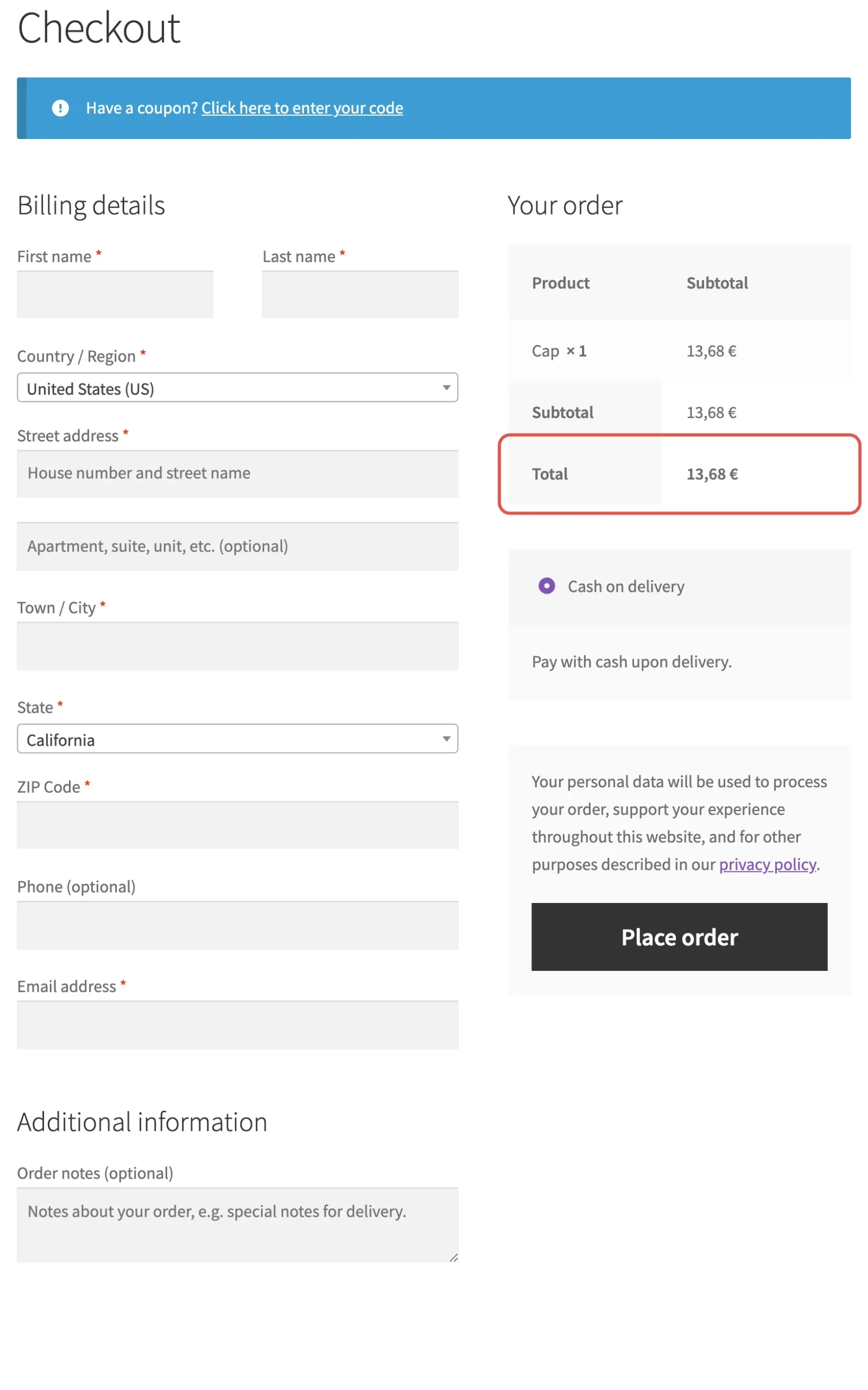
Try Premmerce Multi-currency free on wordpress.org, or compare the premium plans for product-level currencies, geolocation and automatic rates.
Comments

Ready to Get Started?
Join over 100,000 smart shop owners who use Premmerce plugins to power their WooCommerce stores.
Get started