
Product Filter 3.8 released: Cleaner filter URLs and more
I’m pleased to announce the release of Premmerce Product Filter for WooCommerce 3.8. 🎉
Product Filter 3.8 gives premium stores cleaner filter URLs, without the “attribute-” prefix, and fixes more than 20 bugs across SEO rules, AJAX filtering and the price filter. It’s the biggest update since 3.7, and every release now runs an automated test suite on PHP 7.4, 8.1 and 8.3 before it ships.
Let’s get into it!
Cleaner filter URLs without the attribute prefix
With permalinks on, Product Filter gives every filtered page its own URL. Until now, each filter in that URL started with a prefix, “attribute-” unless you’d set your own:
/shop/attribute-color-red/
Store owners asked for a way to drop it, so the URL reads like the rest of the store. Version 3.8 adds a “Don’t use an attribute prefix” setting under Premmerce > Product Filter > Permalinks. Tick it and the same page lives at:
/shop/color-red/
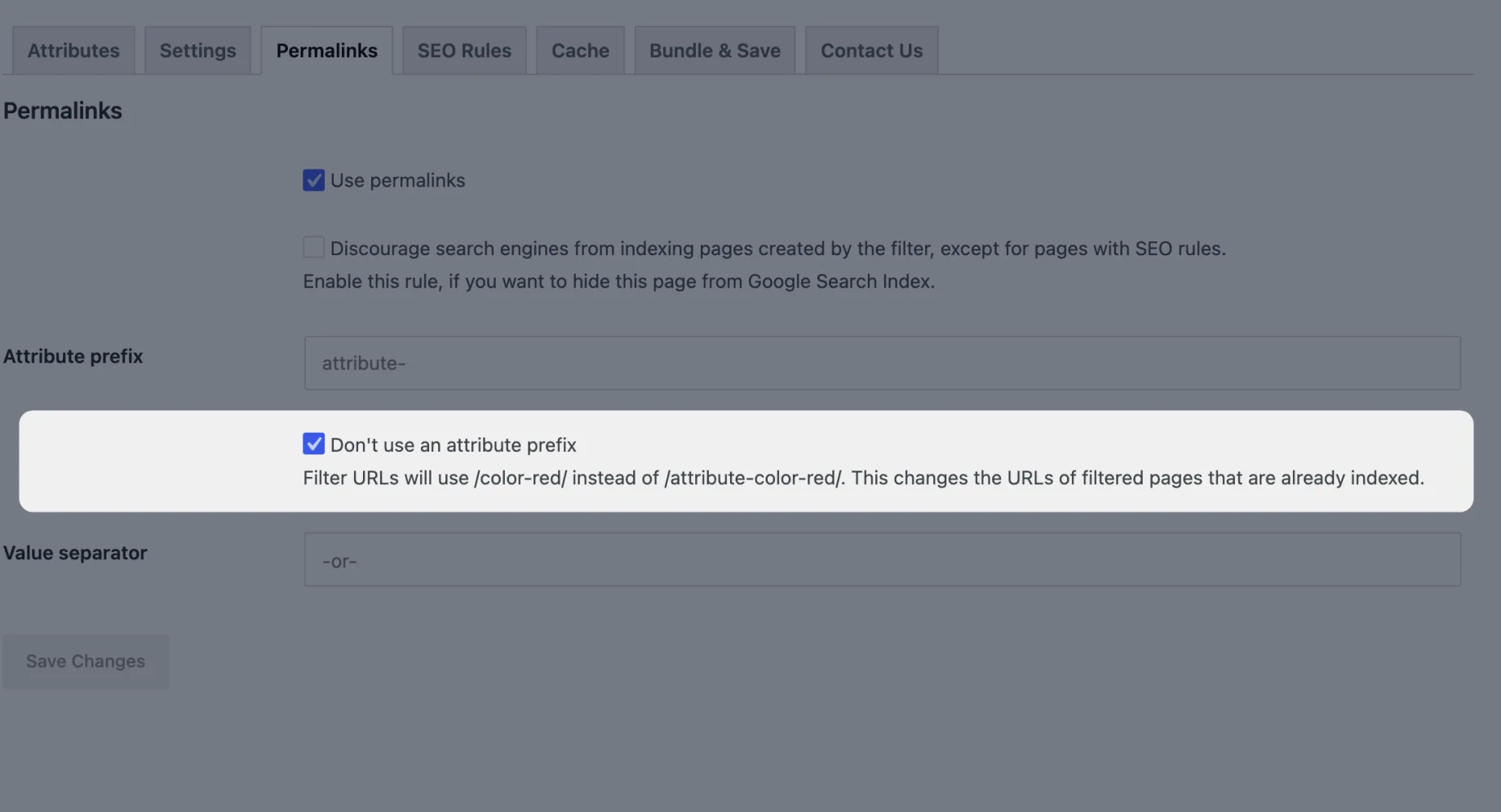
Changing URLs that search engines have already indexed is the risky part, so we built it to be safe:
- Old URLs redirect. A visit to an old prefixed URL gets a 301 redirect to the new one, query string included, so indexed pages keep their traffic. That works for the default “attribute-” prefix and for a custom prefix you used before. Developers can turn the redirect off by returning
falsefrom thepremmerce_filter_redirect_prefixed_urlsfilter. - Real content wins. If a product, page, post or product category has the same slug as a filter (a product called “color-gray”, say), its own page still loads.
- Nothing changes until you tick it. The setting is off by default, and existing stores keep their current URLs.
If you use SEO rules, click Update paths on the SEO Rules tab after turning the setting on, so each rule moves to its new URL.
Filter URLs and this setting are part of Product Filter Premium. For more on how filtered pages fit into your store’s URLs, see What is the best permalink structure for WooCommerce?
And more
Most of the rest of this release is fixes, many of them reported by store owners. The ones you’re most likely to notice:
- SEO rules save reliably, including for large categories and on sites with an outdated SEO table, and a failed save now says why
- Filter URLs, SEO rules and active filter links work with non-Latin slugs, such as Cyrillic
- SEO rules can be translated with WPML String Translation (premium)
- The price slider’s range follows the attribute filters you’ve chosen, on stores using WooCommerce’s attribute lookup table
- With “Use AJAX” on, the filter button no longer reloads the page, and filtering no longer fails with an error
- Filter counts are right when a price range is set
- The Yoast and Rank Math sitemap index lists each SEO rules sitemap page once
For the full list of new features, improvements and fixes, see the changelog. If you’re new to the plugin, How to filter WooCommerce products by attribute walks through setting it up.
Next up
Next we’re working on smaller features you’ve asked for: editing filter titles (including the built-in price, rating, on-sale and in-stock filters), moving the price filter anywhere in the filter order, and letting shop managers change filter settings without an administrator account.
Update to 3.8 from your Plugins screen, or get Product Filter free on WordPress.org. What would you like to see in the plugin next? Let us know in the comments.
Premmerce Product Filter for WooCommerce
Get started giving your customers a better way to filter your products to increase site usability and revenue.
Comments

Ready to Get Started?
Join over 100,000 smart shop owners who use Premmerce plugins to power their WooCommerce stores.
Get started